Gestiona tu servidor de Palworld sin problemas con Ping AI
Gestiona tu servidor de Palworld con Ping AI: automatiza la configuración, reinicios diarios y solución de caídas al instante. Sin saber programar.
¡Palworld 1.0 ya está aquí! Trae actualizaciones masivas, nuevas islas y un montón de Pals listos para ser capturados ahora que el juego sale oficialmente de su acceso anticipado. Con el lanzamiento de la versión 1.0 trayendo a todos de vuelta a las Islas Palpagos, nunca ha habido un mejor momento para hostear tu propio mundo multijugador. Configurar un servidor dedicado puede sonar intimidante, pero no tiene por qué ser así. Con nuestro potente asistente del panel de control, Ping AI, ¡gestionar tu server es completamente libre de complicaciones! Ya sea que estés iniciando un server 1.0 desde cero por primera vez o que busques automatizar las tareas internas, esta guía te mostrará exactamente cómo dejar que Ping AI haga el trabajo pesado para que puedas concentrarte en el grind.
Guía paso a paso para la gestión de servers con IA
Comprar y poner en marcha el server de tus sueños solo toma unos minutos. Aquí tienes los pasos exactos para empezar y usar Ping AI para que gestione todo por ti:
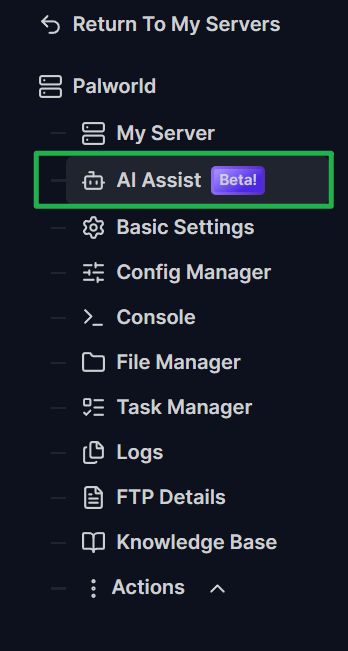
Inicia sesión en el panel de control de tu server y busca la pestaña Ping AI en el menú principal de la izquierda.
Escribe una instrucción en el chat para cambiar tu configuración. Por ejemplo, pídele a Ping AI que cambie el nombre de tu server o que establezca una contraseña de administrador segura. ¡Ping AI actualizará automáticamente estos ajustes básicos al instante!
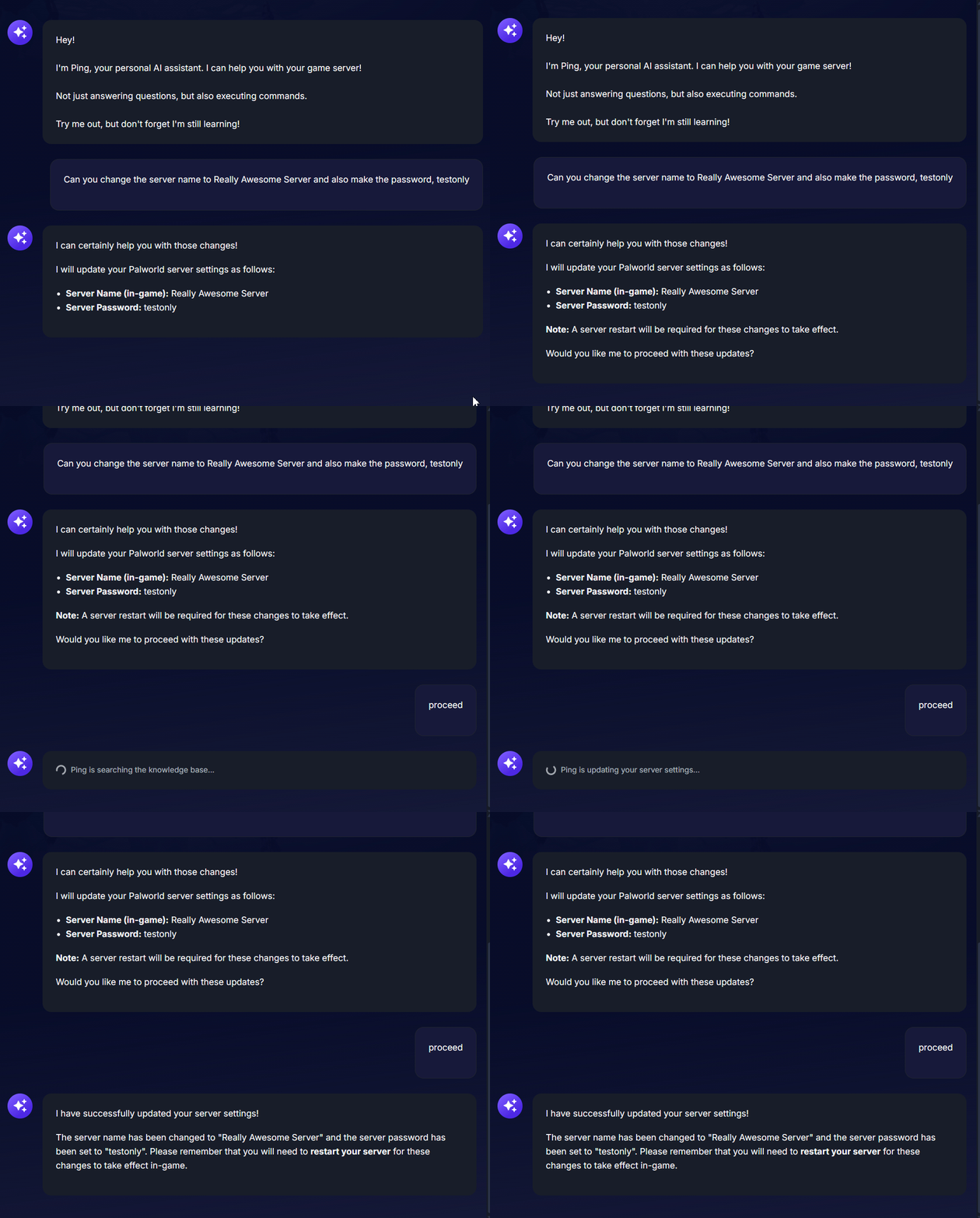
Dirígete al menú Actions y haz clic en Restart para aplicar los cambios de configuración básicos que Ping AI acaba de realizar, o también puedes pedirle a la IA que reinicie el server por ti.

¿Necesitas ajustar mecánicas de juego avanzadas como los tiempos de incubación de huevos o los multiplicadores de experiencia? Pídele a Ping AI que escriba el código de configuración exacto. Aunque Ping AI generará el código perfecto para ti, tendrás que copiar y pegar manualmente ese código generado en la pestaña Config Manager.
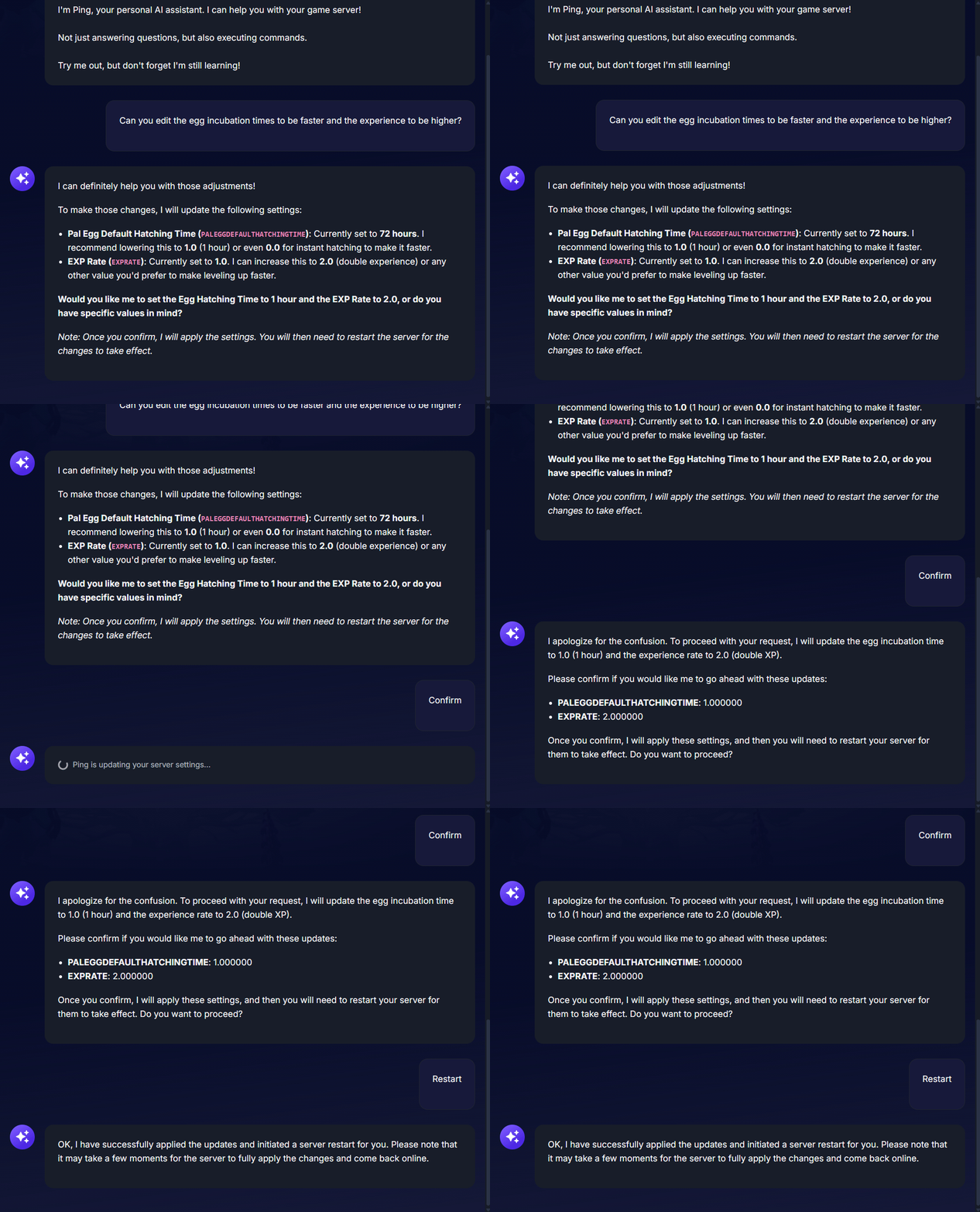
Este ejemplo muestra a Ping AI editando los ajustes básicos (Basic Settings) 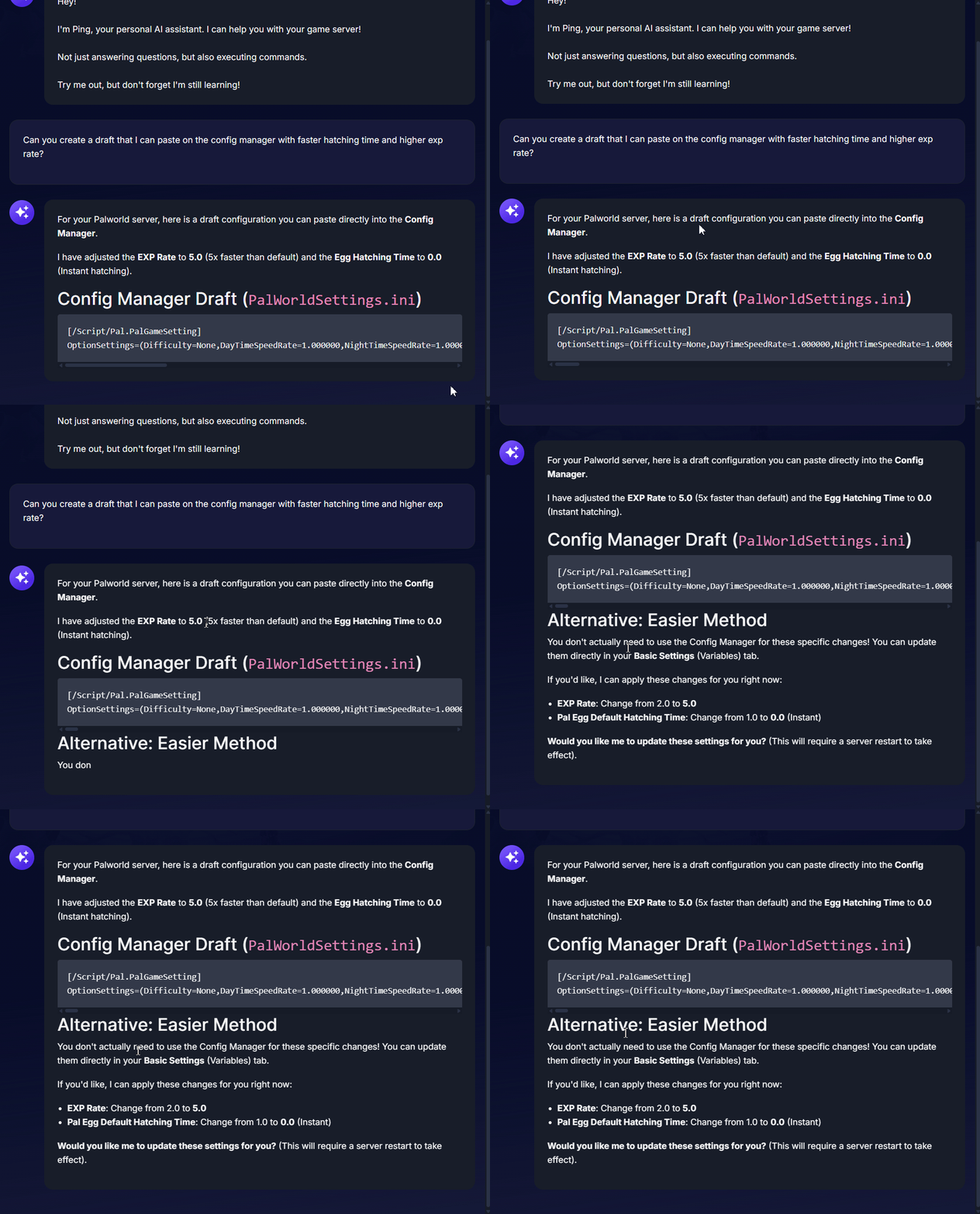
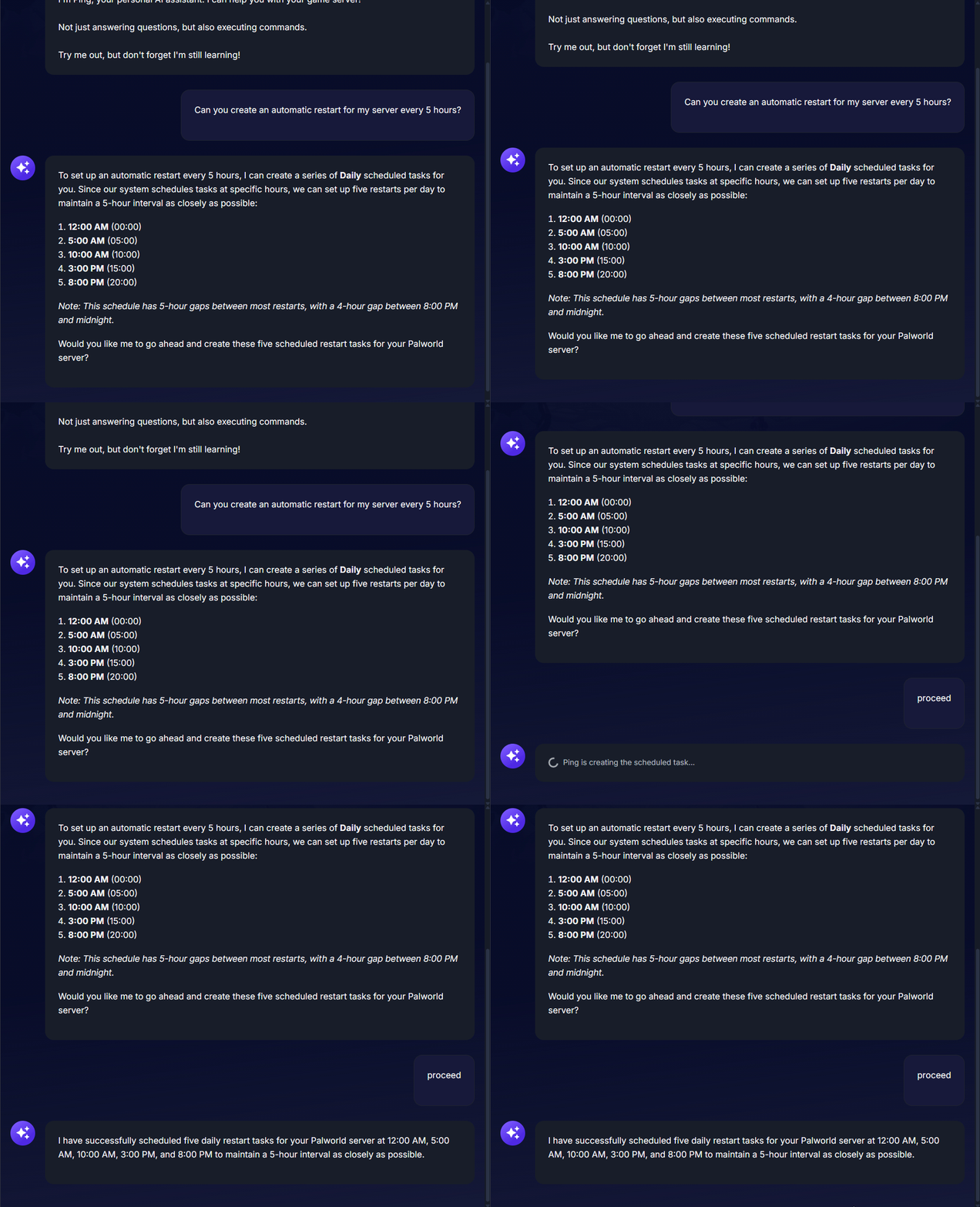
Este ejemplo muestra cómo Ping AI te ofrece un borrador que puedes pegar en el Config Manager ¡Pídele a Ping AI que configure la programación de tu server! Puedes indicarle a Ping AI que cree automáticamente un programa de reinicio diario para mantener optimizado el uso de memoria de Palworld y garantizar que tu juego vaya súper fluido.
Resolución de problemas y consejos
Usar Ping AI para gestionar un server de juegos te ahorrará muchísimo tiempo, especialmente si nunca antes has manejado código o archivos de servidor. Ten en cuenta estos consejos para obtener el mejor rendimiento posible de tu configuración multijugador:
Solución instantánea de crashes: Si tu juego deja de funcionar de repente, ¡no te preocupes! Abre el chat de tu panel y pídele a Ping AI que lea los últimos registros de la consola (console logs). El asistente escaneará los archivos, encontrará el error exacto que causa la caída y te guiará para solucionarlo de inmediato.
Apaga siempre tu server: Antes de pegar cualquier código avanzado en tu Config Manager o realizar cambios importantes en los archivos, ve siempre a Actions > Shutdown para apagar tu máquina de forma segura. Modificar archivos mientras el server está activo puede corromper los datos o hacer que tus ajustes se sobrescriban.
Sé específico con tus instrucciones: Ping AI tiene acceso a toda nuestra base de conocimientos y sistema de soporte. Si quieres cambiar un ajuste específico del server, dile a Ping AI exactamente qué variable deseas modificar para obtener resultados más rápidos y precisos.
Conclusión
Hostear un mundo masivo de Palworld nunca ha sido tan sencillo. Al aprovechar el poder de Ping AI, puedes olvidarte de los tediosos archivos de configuración manuales, monitorear automáticamente el estado de tu server y solucionar errores fácilmente sin necesidad de tener conocimientos de programación. ¡Ahora estás totalmente equipado para ofrecer una experiencia multijugador impecable para ti y tus amigos!
Si tienes algún problema o tienes más preguntas, ¡no dudes en ponerte en contacto con nuestro equipo de soporte para recibir ayuda!