

The worry
Moving it myself means FTP clients, zip files and a corrupt save.
What happens here
No terminal, no zip files. Our engineers pull the folders, rebuild the server here and hand it back clean.
Free on every plan
Limited-time offer:10% offyour game serverwith code
Ends in 0 days, 0 hours and 0 minutesSay where your server lives now. Our engineers copy saves, mods and configs from any host, verify the copy and hand you the new IP.
Free on every plan · nothing to install · 24-hour money-back guarantee
Your folder tree leaves the old host, an engineer verifies every part of it on our hardware, and your new address appears at the end.
Share the save folder, or the old panel or FTP login, and stop there. No terminal, no zip files.
An engineer rebuilds your setup on Ryzen 9 9950X, DDR5 and NVMe, starts it and reads the logs.
The address appears on My Server. Share it when ready, then cancel the old host on your own schedule.
Your old server keeps running the entire time.
Four things that keep people stuck where they are, and what happens here instead.
Moving it myself means FTP clients, zip files and a corrupt save.
No terminal, no zip files. Our engineers pull the folders, rebuild the server here and hand it back clean.
Support goes quiet the moment a mod update breaks everything.
Live chat is open 24/7, staffed by people who run game servers. Write in any language; it translates both ways.
The bill keeps creeping up and the panel hides what I need.
One panel: settings, files, console, logs, mods and scheduled tasks on one sidebar. Plans from $3/month, nothing bolted on later.
My community scatters if the switch drags on for a weekend.
Your old server stays up throughout. We build the copy beside it; you choose when to post the new IP.
Four things move on every migration, and each one is checked before your world goes live.
Your map, your builds and every player's progress, copied folder for folder out of the save directory.
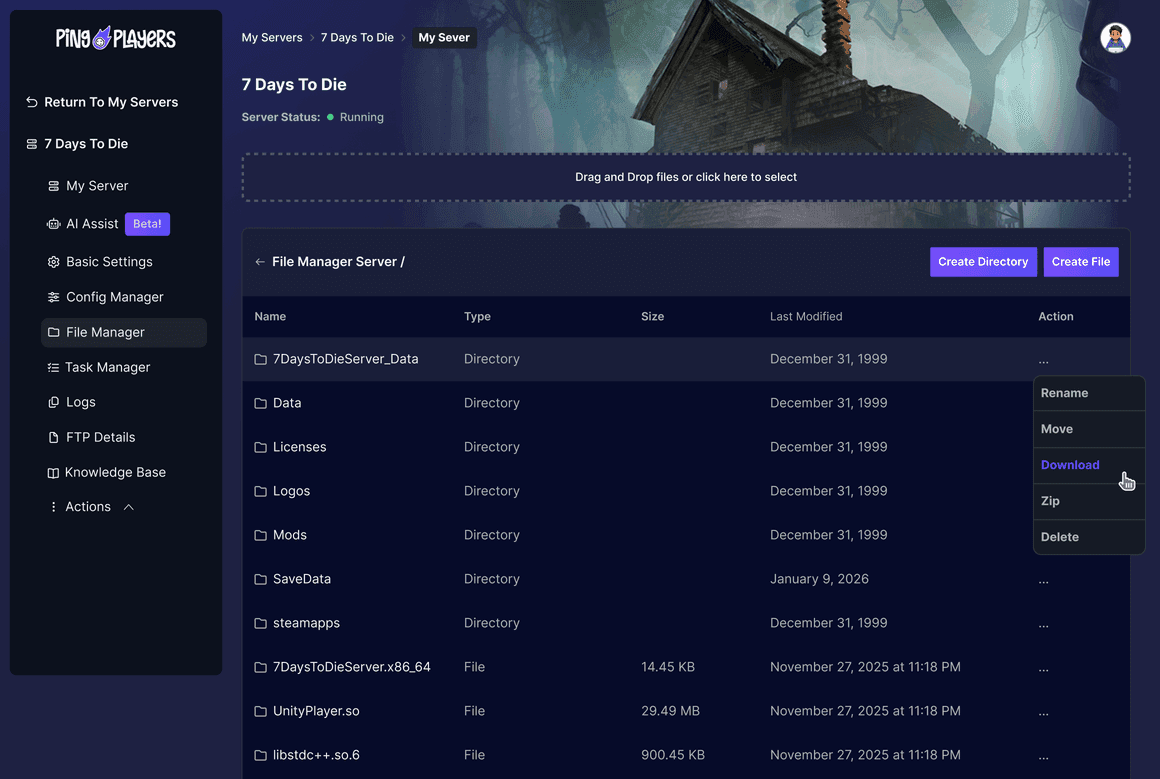
The whole Mods folder, reinstalled in the same load order and checked against the version your server runs.
Difficulty, rates, admin roles, whitelists and ban lists land in Config Manager exactly as you left them.
Nobody restarts from scratch. Ranks, inventories and admin rights come across with the save data.

Pick a plan, open live chat from the Help button in your panel, and say which game, how many players and where it lives now. A person picks it up.
Six Trustpilot reviews on data transfers, saved files and the people in live chat, quoted as written.
Customer service team was extremely fast and effective with fixing server issue that could not be resolved on users end. What was supposed to be a server wipe was resolved without any data lost. Big thanks to the engineering team and Nicole!
Quick and helpful response that saved my game files.
Very Quick and easy to use, very fast service when using the website chat function, get a response almost immediately. I had great help from Nicole who answered all my questions and went above and beyond to provide me with extra relevant info related to my query which she believed was worth me knowing!
Lautaro was very helpful with the issue and was patient while going thru the troubleshooting and data transfer. After about 1hr of troubleshooting they were able to solve the issue. Customer service was great.
Kimmy was absolutely amazing!! Very kind and professional. Also brilliant. 4 people spent 3 hours trying to fix a fubar config file before calling for help. In less then an hour she had it up and running and restored to its original glory. Thank you so much for your help and brilliance
Nicole was very helpful and as a first time server host she help guide me into finding the right server for me and now me and my buddies are having a blast fighting monsters together!
4.9 Excellent on Trustpilot from 900+ reviews.
What people ask in live chat before they send us a save folder, answered here first.
Yes. The whole directory comes across, Mods folder included, and an engineer starts the server and reads the logs before handing it back. A mod that fails to load shows up there, before go-live.
Open live chat and say so. Share the old control panel login or the FTP details and we pull the files ourselves. Most first-time hosts start exactly there.
Yes, on every plan, including the smallest one. You pay for the PingPlayers plan you pick, from $3/month, and every plan carries a 24-hour money-back guarantee.
No. Your old server keeps running the entire time. The copy is built and verified next to it, and nothing changes for your community until you post the new IP.
Any of them: another hosting company, a rented VPS, a Pterodactyl or cPanel install, or a machine in your own house. You only need to share the files or a login that reaches them.
That is what the verification step is for: the copy is started and checked before you point anyone at it. If something surfaces later, live chat stays on it, and the 24-hour money-back guarantee still applies.
Yes, and only when you are ready. We never touch your old account. Most people leave it running for a few days after the switch, then close it once the community has settled.
Yes. Live chat is staffed 24/7 by people, not a bot queue, and the same team handles the move. Write in any language: the support system translates every message both ways.
Yes. Ask live chat and the server moves to any of our 12 locations on request, world and mods included. Same hardware and same price in every location.
Pick a plan, tell live chat where your server lives now, and the copy arrives checked. Your community moves when you say so.
We use cookies to enhance your browsing experience, serve personalized ads or content, and analyze our traffic. By clicking "Accept All", you consent to our use of cookies.